
Creation of new Peppol IDs now possible via wizard
The existing function for creating a new Peppol ID has now been expanded into a wizard. To assist in creating a new Peppol ID and all related settings, the wizard will guide you through the following 5 steps:
- Peppol ID: Creation of the Peppol ID as before
- Business Card: Creation of the Business Card and publication in the Peppol Directory
- Message Level Responses: Creation of the current document profile of “Message Level Response“
- Other Documents: Creation of an additional document profile
- Summary: Summary of the selected settings
Notes:
- Setting the Business Card is mandatory from now on when a new Peppol ID is created. If your Peppol ID is registered with another provider, the Peppol ID and the Business Card will be created but the Peppol ID cannot be used for receiving.
- Step 3 and 4 are not mandatory. This information can be added at any time later – as before – in the tab “Document Profile”.
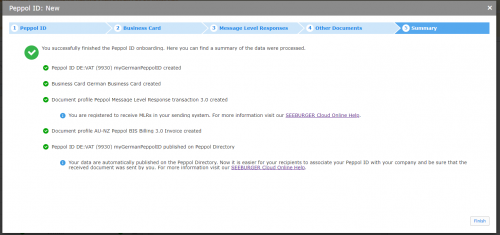
Peppol App > B2B Entries > Peppol IDs > Button “New”
Alisa Scholz (07252/96-1476, a.scholz@seeburger.de) and Katharina Koch (07252/96-3611, k.koch@seeburger.de) will be happy to answer any questions you may have.