
New integration asset catalog
The new integration asset catalog is now available for you in the “Assets” menu item within the Integrator Workspace. This catalog serves as your centralized hub for managing connectors, offering an intuitive interface to easily search, upload, and manage connectors for your integration flows.
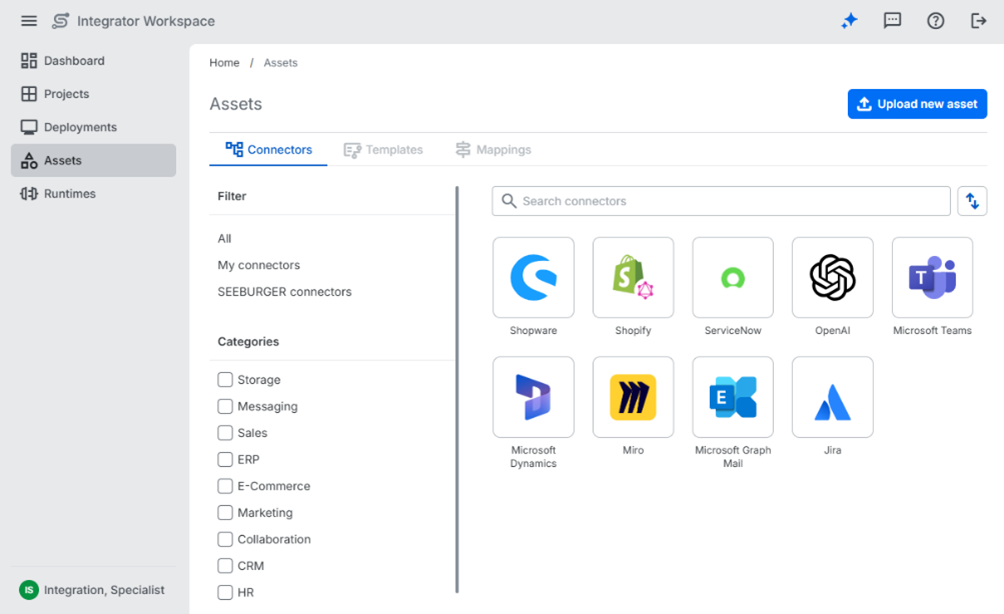
Key features:
Browse and view connectors: Access a comprehensive list of all available connectors in your organization, including both your own and SEEBURGER-shared connectors.
Upload new connectors: Add new connectors directly to the catalog, making them immediately available for use in your integration flows.
Update existing connectors: Modify your existing connectors as needed to reflect changes in functionality or metadata.
Filter options:
⦁ By owner: Choose to view only connectors you have uploaded or explore SEEBURGER-shared connectors across your organization.
⦁ By category: Narrow your view based on predefined connector categories (e.g., CRM, ERP, Messaging).
Search and sort capabilities:
⦁ Search by name: Quickly locate specific connectors using keyword search.
⦁ Sort options: Organize the connector list by name or creation date to find what you need faster.
This integration asset catalog simplifies connector management and helps you maintain a well-organized, reusable library of integration assets tailored to your integration flows.
You can find more information in our Integrator Workspace Help.
Integrator Workspace > Assets
Integration of asset catalog into Integrator Workspace
You will now find the new centralized asset catalog integrated directly into your Integrator Workspace, making it easier for you to browse, select, and add connectors to your flows. Any connectors you upload during flow creation are automatically added to your organization’s asset catalog. Likewise, connectors uploaded directly to the catalog will appear in the “Assets” panel under the “Connectors” list in the flow designer, so you can access them quickly while designing your integration flows.
This integration ensures seamless access to assets within the flow design environment, enhancing efficiency and accelerating workflow creation.
You can find more information in our Integrator Workspace Help.
Integrator Workspace > Projects > Flows
Integrator Workspace > Assets
Auto parent node creation
Usability tests revealed that users often found it unclear that the parent node must be mapped first before the child node can be assigned a value. To make this easier for you, we have introduced an automatic parent node creation mechanism.
Now, when you map a child node, the required parent node is created for you automatically – making the mapping process smoother and more intuitive.
Visual editor panel for mapping configuration
We introduced a visual editor panel that provides you with a clear view of the operation sequence and a dedicated workspace for configuring mappings.
This feature reduces the effort required to follow operation sequences and improves the overall clarity and efficiency of the mapping configuration process.
Mapper error handling
We introduced a structured and comprehensive error handling framework for all stages of the mapping lifecycle in both the code and graphical editors.
The framework categorizes issues into syntax errors, semantic errors and warnings, and runtime diagnostics (errors, warnings, and informational messages). Each category has tailored handling and presentation strategies.
This update provides clear and immediate feedback, making it easier for you to identify and resolve issues. By linking server-side validation with front-end rendering, the system ensures no errors are missed.
It also supports the graceful handling and visualization of partially valid mappings, sets the foundation for a centralized diagnostics and notifications panel across tools and use cases, and enables faster iteration cycles.
Integration assets
New connectors added:
- 1. Shopify
- 2. ServiceNow
- 3. JIRA
- 4. Marketo
- 5. MS Dynamics CRM
- 6. MS Graph Calendar
- 7. MS Graph Email
- 8. MIRO
- 9. OpenAI
- 10. Shopware
- 11. Airtable
- 12. Workday
- 13. Nextcloud
- 14. UPS
- 15. Dropbox
- 16. Paypal
- 17. DHL
- 18. Salesforce
We are excited to announce the integration of new connectors into our asset catalog. These connectors support seamless integration and data exchange between these services and our platform. These connectors help streamline workflows and support more efficient integration scenarios.
These new connectors enhance integration capabilities by allowing you to connect popular services directly with our platform. They help automate processes, reduce manual work, and improve overall productivity by enabling smoother, faster workflows.
Schema updates
This feature allows integration specialists to update mappings with newer versions of schemas to ensure stability and the ability to map newly available data without relying on deprecated versions.
Key features:
⦁ Schema updates can be executed via the edit mapping configuration option in Webper.
⦁ Both source and target schemas can be replaced entirely; this replaces the whole single schema rather than manipulating parts.
⦁ After a schema change, the mapping is automatically executed again, and failures are presented in the code editor for user review and correction.
⦁ Support for existing schema import methods including deriving from sample files, query connectors, and file uploads.
⦁ Schema imports adjust namespace and filename as needed to support the schema update.
⦁ Safeguards ensure that a new version does not delete the existing mapping, and incompatibilities are visualized and require user adjustment.
Benefits:
You can maintain up-to-date mappings aligned with the latest schema versions, improving reliability and data accuracy. This reduces risks from using outdated or deprecated schema versions.