
Assets: Card view for connectors
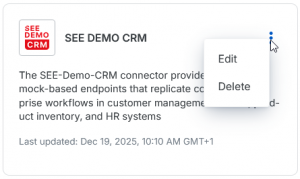
The “Connectors” overview in the “Assets” menu item has been redesigned to use a card view layout, making it more visually appealing and informative.
Each card now includes:
- ⦁ Connector icon for quick identification
- ⦁ Connector name
- ⦁ Short description for context at a glance
- ⦁ “Last updated” timestamp for better status awareness
- ⦁ A convenient menu accessed via the three-dots icon to directly edit or delete connectors without leaving the overview
This enhancement improves usability by reducing navigation steps and giving you all essential details in one place. The new design helps you manage connectors faster and more efficiently.
Here is an example of the new card view:
You can find more information in our Integrator Workspace Help.
Assets > Connectors
Assets: Short description for connectors
Connectors in the “Assets” menu item now support a short description field. This allows you to add a brief summary of each connector’s purpose or functionality, making it easier for you and your team to understand its role without opening the details screen.
This enhancement improves clarity and collaboration by providing context right where you need it.
You can find more information in our Integrator Workspace Help.
Assets > Connectors
Assets > Connectors > Upload connector
Assets > Connectors > Edit connector
Support comparison and logical expressions
This feature adds enhanced capabilities to the expression language by supporting comparison and logical operations. It provides the ability to write more complex and meaningful conditions within mappings and configurations.
Key features:
⦁ Enables comparison operators (such as equal, not equal, greater than, less than).
⦁ Supports logical operators (AND, OR, NOT) for combining conditions.
⦁ Enhances expression language power and flexibility.
Benefits:
You can create more precise and complex expressions to control data transformations and business logic, improving the adaptability and intelligence of your integrations.
Mappings > Visual Editor > Context Menu
Support bracket expression
This feature introduces support for bracket expressions within the expression language, enhancing the ability to manipulate and access data structures more precisely.
Key features:
⦁ Allows use of bracket notation to access elements in arrays, maps, or other indexed data.
⦁ Improves flexibility in writing expressions for complex data access.
⦁ Supports dynamic key and index usage within expressions.
Benefits:
You gain more powerful tools to work with structured data, enabling more detailed and accurate mapping and transformation logic.
Mappings > Visual Editor > Context Menu
Monitoring
This feature introduces the core monitoring functionality, providing the ability to track and view execution and failure events within the system.
Key features:
⦁ Access to an overview of executions and their statuses.
⦁ Visibility into failure occurrences to support troubleshooting.
⦁ Basic filtering and navigation within the monitoring interface.
Benefits:
You can now observe and analyze the operational status of your integration processes, enabling timely detection and resolution of issues.
Montioring
If you have any questions, please contact your local sales representative or contact us via integrator-workspace-feedback@seeburger.de.