
New REST API: CMA now connects to the SEEBURGER Supplier Portal
With SP 168, we introduced a REST API that directly connects CMA to the SEEBURGER Supplier Portal (SSP). This integration streamlines supplier onboarding and enhances overall efficiency.
Key features:
- • Automated onboarding: Manual steps are eliminated—supplier registration is triggered automatically via API.
- • Seamless integration: Onboarding can be initiated directly in the CMA Cloud Portal with built-in validation and error handling. The API ensures accurate and timely data exchange between CMA and SSP.
- • Full transparency: Supplier registration status is visible across both CMA and SSP portals.
- • Resilient implementation: If users are already using the SSP with another customer, the registration process is adapted automatically to their existing setup, avoiding duplication and delays.
Notes:
- • Usage of the API must be configured by SEEBURGER for each SSP customer.
- • CMA campaings can be set up by SEEBURGER or the customer.
- • The registration link will be active for 7 days, once started the process must be completed within 2 hours.
This integration marks a significant improvement in user experience and operational efficiency. For support, please contact our service team.
More information on how to integrate the REST API you can find in the SEEBURGER Cloud Online Help.
Improved participant management for CMA Surveys with UMS
With SP 169, we introduced two new features to simplify and accelerate participant management in CMA surveys.
Add participants by User Management Service Group
A new wizard interface makes it easier to add participants:
- • Quickly select users based on their UMS group.
- • Choose from all users in the organization or filter by UMS group.
Enhanced usability:
- • A confirmation dialog appears when no users are selected.
- • Only unassigned users are shown to reduce clutter.
Optional login requirement
Based on customer feedback, survey access is now more flexible:
- • UMS users can now participate in surveys without logging in.
- • A new checkbox in the participant dialog allows enabling and disabling login requirements.
- • The login status is clearly visible in the participant details screen.
These enhancements improve ease of use, shorten setup times, and offer greater control over survey access. Feel free to reach out with questions or feedback.
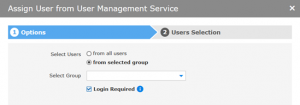
Project Details > Participants > New > From User Management Service > Select Users from selected group
Project Details > Participants > New > From User Management Service > Login Required
Project links for Self-Services
With SP 172, we are introducing project links—a smart new way to provide direct access to self-service projects via custom URLs. No more updating external pages when a project changes.
What are project links?
Project links offer a user-friendly URL that takes users directly to a specific self-service project—bypassing manual navigation through menus. They allow you reuse a fixed URL in another project after you made changes in a copy of the original project.
Email integration
You can now embed the project link directly into email templates using a special variable. This ensures participants always receive the current link, without needing to resend or edit emails. This simplifies communication and saves time.
More information on how to configure project URLs and how to reuse them you can find in the SEEBURGER Cloud Online Help.
Project Details > Settings > Project Link
New monitoring option for approval workflows in CMA
With SP 173, we are extending the approval process in CMA—providing greater transparency and control in task handling.
What it does:
Approvals serve as checkpoints that temporarily pause task progress until a review is completed. With the new dedicated “Approval” menu item, you now get a clear overview of all tasks awaiting approval across your projects.
Key features:
- • Sheet-level activation: Approvals can now be configured per sheet, enabling flexible and targeted review processes.
- • Interaction in the workflow: When a task requires approval, users are notified and cannot proceed until it has been reviewed. If the task is returned, users receive feedback and can revise their input. Approved tasks automatically move the workflow forward.
- • Approver interface: Approvers see only the projects relevant to them and can choose to approve, return (with comments), or reject tasks. Admins and users with extended permissions can manage approvals across projects, including those related to self-service tasks.
- • New “Approval” menu item: A new, dedicated menu item provides full visibility into all approval tasks across projects—making it easier to track pending actions and support faster, more informed decisions.
This feature adds clarity, control, and traceability to your project workflows. For more information contact your administrator.
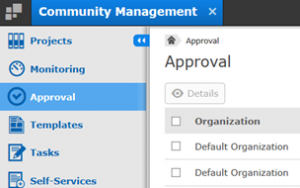
Main Navigation Menu > Approval
Nadja Koshofer (07252 96-1428, n.koshofer@seeburger.com) will be happy to answer any questions you may have.