
Introducing the “Initializable” download button
With SP 168, we are introducing a new feature in our Community Management Application (CMA): the “Initializable” download button. This update provides you with more flexibility and control when downloading content from the platform.
What is the “Initializable” download button?
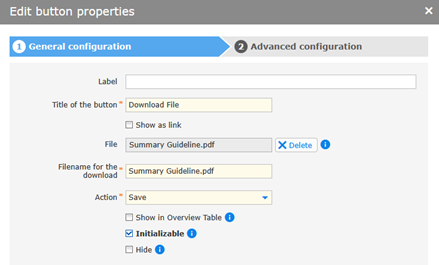
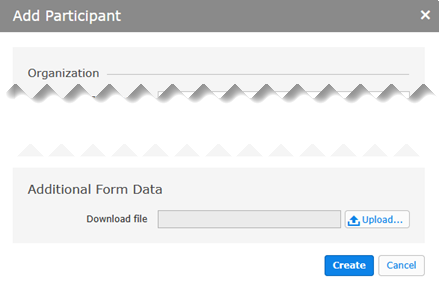
The “Initializable” download button is designed to provide seamless functionality for downloading files with an added level of customization. Unlike previous versions, the button now allows users to configure an option for offering individual files for each participant in a project.
Key benefits:
- • Customizable options: Tailor the button to suit your needs by either setting a default file or leaving the option empty.
- • Enhanced user experience: With more intuitive controls and clearer actions, users will experience a smoother process when distributing downloadable content.
- • Dynamic action setup: Choose whether to define a single downloadable file for all users or provide unique files for each participant when adding them to the project.
This new feature empowers developers and content managers to streamline content distribution. By enabling project admins to distribute individual files to each participant, the “Initializable” download button provides a more tailored and user-friendly solution.
In Designer View: Add > Download Button > “Initializable” checkbox
In Participants View: New > From Scratch > Additional Form Data
Introducing the “Export name” reference feature
With SP 168, we launch the “Export name” reference feature: a powerful enhancement designed to allow data referencing between fields in CMA forms.
What it does:
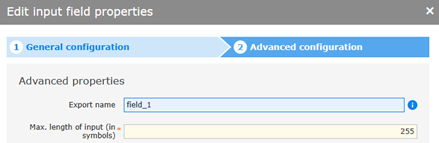
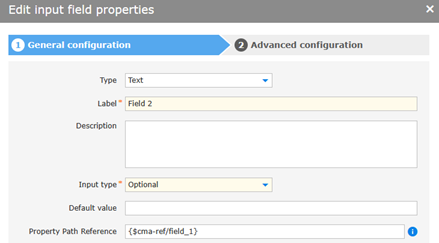
The “Export name” reference allows you to transfer values between CMA fields effortlessly. By setting a unique “Export name” property on a field, you can reference and populate data in another field using the syntax ${cma-ref/export_name}. This feature works seamlessly within the same page or across consecutive pages, offering new possibilities for efficient data handling.
Key benefits:
- • Flexible field referencing: Easily connect fields within forms to dynamically update values.
- • Support for various field types: Compatible with text, selection, and date fields for robust configuration.
- • Enhanced page navigation: Transfer data across consecutive pages to maintain workflow continuity.
Use cases:
- • Populate dependent fields dynamically based on user input.
- • Streamline workflows across multi-page forms by transferring values between pages.
Limitations:
While versatile, this feature has certain restrictions. It does not support fields already bound to data sources, for example, dynamic display or master data fields. The transfer of data for upload fields and group tables is only supported between different pages and not on the same page.
In Designer View: Field properties > General configuration > Property Path Reference
Introducing long integer support in CMA
With SP 166, we introduced a significant enhancement to our Community Management Application (CMA): long support for 64-bit integer values. This update addresses a crucial requirement from ongoing projects, ensuring seamless handling of long integers across various processes. Previously, CMA could not process these long integers. Handling large numeric values is now easier.
Key highlights:
- • Support for long integers (64-bit): You can now work with 64-bit integers seamlessly in CMA, making it easier to manage large datasets that require this level of precision.
- • Backward compatibility: To ensure no disruptions for existing users, we have introduced a global setting to toggle long integer support on or off. By default, the setting is disabled for compatibility.
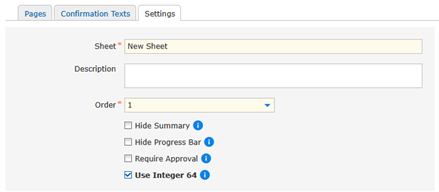
- • Sheet-level customization: You can configure whether to use 32-bit or 64-bit integers on a per-sheet basis. This flexibility makes it possible to manage mixed systems without issues.
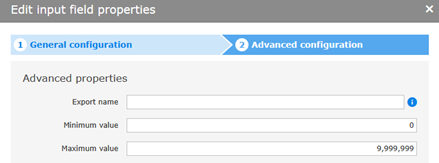
- • Minimum and maximum boundaries: Along with integer support, you can now set minimum and maximum value constraints for integer fields.
This update ensures that you can handle a wider variety of data inputs while maintaining control over their size and range. Whether you are dealing with large ID numbers or need specific limits on form values, this feature provides more flexibility for your workflows and integrations.
We hope this new feature will improve your experience with CMA. As always, we encourage you to share your feedback or ask questions.
In Designer View:
Sheet > Settings
Input field of type “Integer” > Advanced configuration
Nadja Koshofer (07252 96-1428, n.koshofer@seeburger.com) will be happy to answer any questions you may have.