
Opening invoices from “Monitoring” in “Outbox”
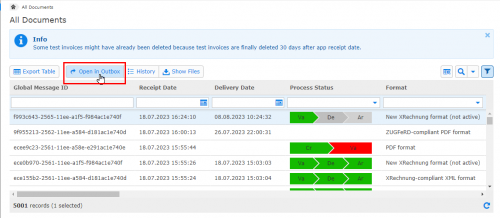
Users with rights for the menu item “Monitoring” can now use the new function “Open in Outbox” to open invoices selected in “Monitoring” directly in the menu item “Outbox”. There, the invoices can be viewed and also – if not yet sent – edited.
Invoice Delivery Service > Monitoring > Button “Open in Outbox”
Optimized column “Downloaded by Recipient”
For a better overview, the column “Downloaded by Recipient” has been shortened. If the recipient has downloaded the invoice, only the date and time are now displayed – analog to other date columns.
Invoice Delivery Service > Outbox > Button “Downloaded by Recipient”
Invoice Delivery Service > Monitoring > Button “Downloaded by Recipient”
Alisa Scholz (07252/96-1476, a.scholz@seeburger.de) will be happy to answer any questions you may have.