
September 17, 2026
Improved cardinality indicators in schema trees
Cardinality information in the source and target schema trees is now displayed using standard cardinality notation. This makes it easier to identify optional, mandatory, and repeating schema elements at a glance.
Key features or highlights
Instead of the previously used asterisk (*) and loop icons, tree nodes now display cardinality information using standard notation, making schema constraints easier to understand at a glance.
Examples include:
- • 0..1 – optional element that can occur once
- • 1..1 – mandatory element that occurs exactly once
- • 0..* – optional element that can occur multiple times
- • 1..* – mandatory element that can occur multiple times
Cardinality indicators are displayed directly in front of the corresponding tree nodes.
A new “Show cardinality indicators” option is available in the “Mapping Preferences”. Cardinality indicators are enabled by default and can be disabled if you prefer a cleaner tree view.
Benefits to users
This change provides a clearer and more consistent representation of schema cardinality while allowing you to customize the schema tree according to your preferences.
You can find more information in our Integrator Workspace Help.
September 15, 2026
Changeable “Header key” in “API Key” account authentication
For accounts that require “API Key” as authentication type, the previous limitations for the header key were removed.
Key features:
- • The “Header key” field is now editable for API key authentication, except for selected SEEBURGER-maintained connectors with fixed header keys.
- • If the OpenAPI specification of a connector provides a header key, the “Header key” field is prefilled with that value. You can change it if needed or restore the original value from the drop-down list.
- • If no “Header key” is defined in the OpenAPI specification of a connector, the most commonly used key “X-API-KEY” is shown as a placeholder, and you can enter any value.
Benefits:
- • Configure the correct authentication header even when the OpenAPI specification contains incomplete or incorrect header information.
- • Reduce manual workarounds and errors.
- • Integrate APIs more flexibly and with less configuration effort.
September 8, 2026
Simplified flow creation
We have changed the way flows are created. Previously, a flow assistant guided you through the first steps in the Integrator Workspace. Since guided tours are available and trigger types can be changed later, the flow assistant is no longer beneficial. You can now start designing a flow immediately.
Key features:
- • The initial “Create flow” dialog has been removed.
- • A new untitled flow is created automatically. You can rename the flow by clicking the edit icon next to the flow name.

Start designing your flow immediately without having to come up with a flow name first.
You can find more information in our Integrator Workspace Help or take the updated “Create a flow” guided tour.
Projects > [Project] > Flows > Create flow
Changeable trigger type
Previously, changing the trigger type of an existing flow required you to either remove all flow steps or create a new flow. With the updated trigger configuration, you can now change the trigger type at any time.
Key features:
- • You need to configure a trigger type before you can deploy your flow.
- • You can save your flow even if no trigger type is configured.
- • You can change the trigger type in your flow at any time.
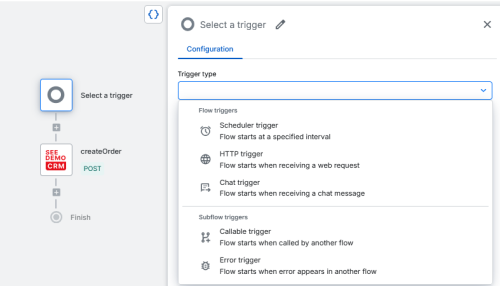
Benefits:
- • You can change the trigger type with minimal effort, without having to rebuild your flow.
- • When using flow templates from the “Assets” menu item, you do not need to keep the predefined trigger type. Simply download the flow template and change the trigger type to meet your requirements.
Projects > [Project] > [Flow] > “Select a trigger” flow step
AI-based sample data generation for mappings
You can now use AI to generate sample message data directly in the mapping editor. This helps you quickly create realistic data for testing and validating your mappings.
Key features:
- • The “Generate sample data using AI action” is available in the mapping editor.
- • Sample data is generated based on the selected schemas.
- • Generated data follows the schema structure and uses realistic example values where possible.
- • You can generate new sample data multiple times.
- • The generation process provides feedback, including loading indicators and error messages.
- • Supported formats include JSON, XML, CSV, EDIFACT, and X12.
Generate realistic sample data in seconds instead of creating it manually. This speeds up mapping development and testing, especially for complex schemas such as EDIFACT, and helps you better understand schema structures.
You can find more information in our Integrator Workspace Help.
Projects > [Project] > [Mapping] > Create mapping
Advanced controls for expanding and collapsing schema trees
You can now expand or collapse multiple nodes in the source and target schema trees with a single action. This makes it easier to navigate large and deeply nested schemas when creating mappings.
Key features:
- • Expand or collapse all nodes in a schema tree.
- • Expand or collapse nodes by tree level.
- • Continue to expand or collapse individual nodes using the arrow next to the node.
- • Adjust the source and target schema trees independently.
The new controls help you quickly adjust the level of detail displayed in a schema tree, making complex schemas easier to navigate and reducing visual clutter.
You can find more information in our Integrator Workspace Help.
Projects > [Project] > [Mapping]
Prevent saving incomplete expressions in visual editor
The visual editor now prevents incomplete or invalid expressions from being saved. This ensures that only complete expressions are transferred to the mapping code.
Key features:
- • The “Apply” button remains disabled until all required parts of an expression are complete.
- • Incomplete parts of an expression are highlighted and provide information about what is missing.
- • Validation also covers nested expressions.
- • A confirmation dialog appears when you close the visual editor without applying your changes.
- • Incomplete expressions are not transferred to the mapping code.
You can create and edit expressions without the risk of transferring incomplete or invalid expressions to the mapping code. This improves reliability and helps prevent mapping errors.
AI-proposed mapping code directly from SIA
You can now apply code changes proposed by SIA directly to your open mapping in the Integrator Workspace. Describe the change you need in the SIA chat, review the proposed code, and apply it with a single click – saving you from manually copying and pasting code into the editor.
Key features:
- • Ask SIA to modify existing mapping code, such as adding empty-value handling, simplifying conditions, or adding explanatory comments.
- • Apply proposed code snippets directly to the relevant location in the mapping code editor.
- • Stay in control: changes are applied only after you choose to apply them.
- • The mapping executes automatically after a change is applied, using the existing error handling if execution fails.
Benefits:
- • Reduce manual effort when incorporating AI suggestions into your mapping.
- • Refine mapping logic through conversation while working in the Web Mapper.
- • Quickly check the result of an applied change through automatic mapping execution.
If you have any questions, please contact your local sales representative or contact us via integrator-workspace-feedback@seeburger.de.