
November 18, 2025
Separate service notifications for Service and Product Owners
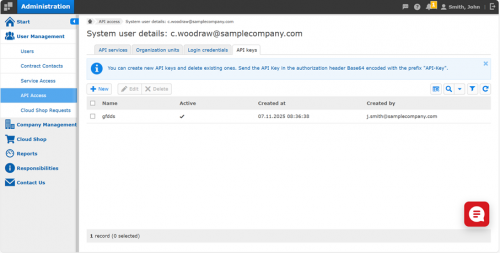
You can now create and manage API keys for system users directly in the “Administration” app. API keys provide a secure and flexible way to authenticate users without passwords.
Each API key is unique, can be activated or deactivated individually, and is displayed only once during creation—so be sure to copy and store it securely right away.
With the new “API Keys” tab, you can:
- • Create new API keys for system users.
- • Edit existing API keys to change their name or activation status.
- • Delete API keys that are no longer needed.
Deactivated or deleted keys immediately become invalid, ensuring secure access control.
This feature enhances existing system user management and gives you greater control over API-based authentication.
Note: API keys are an addition to the existing password authentication method which will continue to be supported.
Administration > User Management > API Access > “API Keys” tab
November 12, 2025
Fresh look now also for the “Event calendar” – with the same trusted features
We are happy to announce that the “Event calendar” has been visually aligned with the other menu items of the “Service Monitor”.
What’s new?
The functionality remains the same, with only minor changes in usability:
- • Individual calendar categories can now be shown or hidden as a whole with a single click.
- • In addition to the mouse-over effect, clicking now opens a pop-up window.
- • Page loading times have been improved.
Further functional enhancements to the “Event calendar” are already planned.
Would you like to share feedback on the new design of the “Service Monitor”? Please feel free to use the feedback button in the top navigation bar!
Service Monitor > Event calendar
Lena Galizia (07252/96-2082, m.galizia@seeburger.com) will be happy to answer any questions you may have.